Tuesday, 22 August 2017

Ways to Get More Traffic and Traction byPromoting Your Content Like a Boss

Ways  to Get More Traffic and Traction byPromoting Your Content Like a Boss

Some bloggers seem to have all the luck.
They get way more shares than you. They get tons more email subscribers than you. They get much higher search rankings than you.
And it sucks, right?
Because their content is good, but it’s not great.
Certainly it’s not that much better than yours.
So what are they doing differently?
Why is their content so much more successful than yours?
The difference is in the way they promote it.

What Promotion-Smart Bloggers Know That Most Bloggers Miss

As a blogger, you’ll have been lectured many times on the importance of good content.
Time and time again you’ve been told you must create high-quality content. Awesome content. Even epic content.
But smart bloggers know that while quality is important, it’s just one piece of the content puzzle.
In fact – and prepare to be shocked – it’s not even the most important piece of the puzzle.
Don’t believe me? Ask yourself: who gets more traffic – the blogger who’s great at writing and good at promotion, or the blogger who’s good at writing and great at promotion?
The answer should be obvious. The blogger who’s great at promotion will run circles around the talented writer every time.
Consider this: the New York Times doesn’t publish a list of best books. They publish a list of best-selling books.
See the difference? It’s all about promotion.
And the following tips will show you how to promote your content like a boss:

1) Think Cross-Channel and Multi-Format

When the average blogger thinks about content, they usually think in terms of blog posts. And they often don’t consider at all how readers first encounter those posts.
The boss blogger, however, knows how to combine promotion tactics and content formats for maximum effect.
That means blending search, social and email:
  • Email and social allow you to stay connected to your audience.
  • Social and search enable discovery, bringing new traffic and subscribers.
  • Search and email give you consistent visibility with your readers.
search-email-social
Content is at the heart of all three channels, but you can’t just push out the same content in each. Different formats work better in different places.
Long-form text is good for search. Shareable images work well in social streams.
So a boss blogger creates assets in many formats.
They’re not just creating an endless stream of 800-word blog posts. They create charts, diagrams, SlideShare presentations, downloadable PDFs, infographics, quizzes, expert interviews, whitepapers, videos and podcasts.
Each asset is created with promotion in mind, knowing that different formats get traction in different channels.
And each channel makes different demands on the content creator.

Email Subject Lines, Tweets, Facebook Posts

These need headlines that grab attention, surprise the reader, include numbers (as in, list posts), align with cultural trends or leave a curiosity gap.
Examples:
  • Blog Like a Honey Badger
  • I Thought I Knew Analytics, Until I Watched This Video
  • 101 Ways to Make Your Sales Prospects Smile

SEO-Motivated Content

This requires titles and headings that align with phrases people are searching for – including complete questions and phrases – and long, detailed articles.
Examples:
  • How to Market an Event
  • Keyword Research Strategies
  • How Does Social Media Affect SEO?

Pinterest, Instagram, SlideShare and YouTube

These visual channels require evocative images that grab attention. Do this by including a person’s face and a headline or subheadline from the article. Be sure to size images appropriately for each network.
Examples:
steam-myth
build-reputation
unicorn-cries
If you want a single piece of content to get traction in several channels, combine tactics.
Use provocative images with embedded headlines as the featured image in a post. Then embed a video with a striking thumbnail image or a slideshow with a compelling title slide.

Pro Tip!

To create headlines that get traction in both social media and SEO, use a colon to separate the search-friendly keyword from the social-friendly click bait. This gives you good key-phrase prominence (phrase appears at the beginning of the title) but still lets you leverage human psychology in the rest of the headline/title.
The following are some examples from my blog:
  • Competitive Analysis Tools: 5 Free Ways to See the Analytics of Any Website
  • Neuromarketing Web Design: 15 Ways to Connect with Visitors’ Brains
  • Internal Linking: 9 Best Practices for Internal Links
  • Ego Bait: 5 Simple Ways to Leverage Blog Mentions
  • Thank You Pages: 9 Example of Missed Opportunities
Each of these was effective in both search and social.
So, are you publishing in different formats?
Are you tailoring each piece of content for each specific channel?

2) Use Your Blog as the Ultimate Networking Tool

Boss bloggers are power networkers.
They know that the difference between a popular blog and a deserted blog is relationships. So they’re constantly using their blogs as tools to connect with other people.
Want to build relationships with influencers? Invite people over, have a conversation and deepen those connections. If the website is a house, the blog is the living room.
Here’s how to use your blog as a power networking tool:
  • Take a stand. Rant a little. State an opinion and invite dissent. Start discussions that power players will be unable to resist joining.
  • Move the conversation from the blog into social media and vice versa.
  • Source topics from relevant communities on social media: LinkedIn, Facebook, Twitter and Quora. Intentionally focus on communities where your target influencers are known to hang out.
  • Write detailed, thoughtful comments. Share half-formed ideas and ask for input. Talk to people in the comments of their blogs.
  • Write response posts, adding to what people have written elsewhere. Most people will be flattered that their writing has inspired other people.
  • When you share a blog post, mention specific people who would likely be interested in what you wrote. Use social media to find specific people who will love the content. For example:
crestodina-tweet
So ask yourself: are you making friends on your blog?
If not, you’re doing it wrong.

3) ABC. Always Be Collaborating.

A boss blogger doesn’t work alone. They collaborate – with friends, influencers, readers, even competitors.
Collaboration strengthens your network and goes beyond simple outreach because it creates bonds through content.
Turn strangers into friends by including them in round-ups. Interview the major players in your niche. Ask them to contribute a quote.
The advantage of collaboration is that each co-creator is also a partner in promotion once the content goes live.
And here’s a trick that most bloggers miss: get the voice of your target audience into your content.
Looking to increase engagement with your readers? Come up with a content idea that would benefit from their input. Conduct a survey that puts their views and experiences at the heart of your next post.
Collaboration has two huge benefits: it shares the burden of creating content easier, and it creates allies when it comes time to promote the content.
Example: 6 Questions for 6 Analytics Experts
This post is part of a series where we ask questions to influencers on various topics. This post included input from Justin Cutroni (Google), Neil Patel (QuickSprout) and Dr. Pete (MOZ). Most people love to be interviewed, so the outreach wasn’t difficult.
6-questions-6-experts
Are you using your blog to create reasons to contact people?
Remember – you’re a publisher. You can create reasons to contact people anytime.

4) Go Big or Go Home

Big results come from big efforts. The pros know this well.
Eighty percent of bloggers publish posts that are 1,000 words or less:
survey-results
Example: Survey of 1000+ Bloggers.
But boss bloggers know this, and when other bloggers zig, they zag. So they go big.
They know that content that goes way beyond what’s expected gets more traction than a dozen medium-quality posts.
Content that’s more detailed, more comprehensive, or simply asks the questions no one else took the time to ask cuts through the noise created by less-ambitious content.
Try one of the following:
  • Do a survey of a large number of people in your industry.
  • Collect data over a long date range and publish the insights you discover.
  • Publish a guide that explains every aspect of an important topic.
  • Build an interactive tool that helps your audience make important decisions.
  • Do a series of live webinars.
  • Write and self-publish a book.
Bigger content is far easier to promote. It’s more worthy of shares, links, opens and clicks.
Bigger content also gives you an advantage for longer. Because content that is harder to create is also harder to replicate.
The Internet is ravenous for originality. So feed that appetite with original research.
At Orbit Media, we spent around 100 hours to create an original piece of research that answered big questions in our industry.
How much time do people spend blogging? What percentage of bloggers use editors? How are people promoting their content?
The post was covered by some of the biggest blogs and podcasts in the industry and has been translated into four languages.
1000-bloggers
So are you creating something truly original?
Are you investing enough time in your content?
Are you going big?

5) Get Strategic About Your Content

Most bloggers publish a steady stream of loosely connected posts.
Each week they take an idea, write it up and publish.
The next week? Another idea.
Even if they stick to a strict publishing calendar, they end up with a collection of posts with no underlying strategy. The posts may relate to each other, but then again, they may not. It’s mostly down to luck.
The boss blogger takes a different approach. They start with a plan to dominate a topic within their niche and then systematically create the posts (and other types of content) required to make it happen.
By staying focused on the topic for longer, they get bigger benefits. They don’t create isolated posts; they create interconnected hubs of content.
The benefits to the boss blogger are many:
  • The key phrases they target are interrelated, so they support each other.
  • The connections they build with influencers stay relevant to their content for longer.
  • The most recent subscribers to their lists are more likely to be interested in subsequent posts because there’s topic continuity.
  • They have better opportunities for internal linking between posts.
And they don’t move on to the next topic until they reach the minimum amount of content and connections to be truly influential on that subject.
A strong content hub does the following:
  • Offers value on several interrelated sub-topics
  • Targets several key phrases
  • Includes content in various formats (as discussed in point #1)
  • Appears on more than one website (e.g., via guest blogging)
  • Includes content created by various collaborators
Here’s what it looks like:
content-hub
Example: Lead Generation Website Best Practices (and related content)
First, we created a detailed, practical post and aligned it with a valuable key phrase. Then we published an infographic and five guest posts on similar topics. After several weeks of hard work and focus, the post ranks on page one, above many famous and authoritative websites.
With the hub built, Google now does most of the hard work of promoting the content within the hub. Pretty cool, huh?
So are you focusing on one topic long enough to get real results before moving on?
Are you creating a deliberate structure between your posts and the rest of the content on your blog?

6) Use Your Analytics to Actually Do Analysis

Most bloggers look at their traffic stats, smile or frown, and then move on.
But they’re not doing real analysis. They’re certainly not using the data to guide their next move.
The boss blogger, on the other hand, knows that analytics is not a scoreboard – it’s a decision support tool.
They use insights gained from their analytics to influence their promotion strategy:
  • They learn which posts are traffic champions and which posts are conversion champions, and they know how to use one to promote the other.
  • They know which social networks pull in what kinds of visitors, and they adjust their promotional activities on those networks accordingly.
  • They know which topics get traction, which keywords get clicked, which formats work best, and they use that information to create content that is already optimized for promotion.
If you’re not currently using analytics, you’re blogging in the dark.
And if you’re using analytics simply to keep score, you’re missing a huge opportunity – the ongoing improvement of your blog and its promotion. A process based on trials, testing and a regular review of analytics.
So, are you making decisions based on data?
Do you know what’s working and what isn’t?
Are you truly analyzing the performance of your content?

Are You Ready to Start Thinking Like a Boss?

In a crowded blogosphere, great content isn’t enough.
You need great promotion too.
That’s why popular bloggers are as serious about promoting their content as they are about creating it in the first place.
They think long term. They aren’t limited to one tactic. They focus on relationships. They make decisions based on evidence.
Because that’s how a boss gets it done.
The hard truth is that if a blog post is created without a plan for promotion, it won’t get the traffic or the reach – or the end results – it deserves.
So adopt a promotion-focused mindset and start taking action.
The sooner you start, the sooner you’ll be the boss of your blog, your network and your niche.

Thursday, 17 August 2017

Did You Lose Traffic After Migrating To HTTPS? Here’s How To Fix That.

Did You Lose Traffic After Migrating To HTTPS? Here’s How To Fix That.
Fix the Traffic Loss After Migrating To HTTPS
  • Should you move your website from HTTP to HTTPS?
  • Is it worth moving an information site like a blog to HTTPS?
These were some of the questions we all had last year when HTTPS became really common.
If we look at the current trend, it’s a no brainer that our sites should be using HTTPS.


And when you are starting a new site & implementing HTTPS, things are easy.
However, when you are moving an existing/running site from HTTP to HTTPS, things are not that simple.
Moving to HTTPS is indeed a big technical SEO change. At times, people make mistakes here & start losing their SEO traffic.
However, one can quickly avoid this if they are following all the right steps before & after moving their site from HTTP to HTTPS.

There are a few tools that let us check for proper SSL implementation, but they are not geared toward SEO. These tools usually check for canonical & SSL certificate implementation, which is not enough when you are doing an SEO audit after moving your site to HTTPS.
So, what’s the solution?
SEMrush, which is the most popular SEO tool, recently added an HTTPS implementation audit feature in their site SEO audit feautre. As some of you may know, SEMrush is the most comprehensive HTTPS SEO audit tool I have ever come across.
In this guide, I will share how you can use this tool to check if there’s anything wrong with your HTTPS implementation.

If you have migrated your site from HTTP to HTTPS recently and have noticed a drop in traffic, or if you are planning to move your site to HTTPS sometime in the future (which you should), this is the tool that you should be using.
SEMrush is a paid tool, however, you can use the link below to sign up for a 14-day free trial (you can simply cancel the subscription before 14 days is up).
Test drive the HTTPS feature of SEMrush (14 days of unrestricted access)

How To Use The HTTPS Implementation Site SEO Audit Feature

Note: This feature can be used by existing SEMrush users & new users who are signing up for the first time.
Here is what you need to do:
  • Create an account on SEMrush or log in to your dashboard.
  • Click on Projects on the left side column.
HTTPS Implementation Site SEO Audit
  • Click on Add New Project & give your project a name (see the below screenshot for the reference).
Add new Project
  • Click on Save & then click on the Site Audit” option.
Site Audit
This part is pretty easy & straight forward.
  • Depending upon your site’s size, select the number of pages you want to be crawled.
Site Audit Setting
SEMrush crawlers will start crawling your site & within a few minutes, you will have your report ready.
Along with any HTTPS issues, SEMrush will show all other SEO issues present on your site.
In my case, it took about 5 minutes to crawl 400+ pages.
  • Now, open up the generated report & on the next page, click on the HTTPS Implementation tab to find all existing HTTPS implementation errors on your site.
HTTPS Implementation
In this case, all reports are OK apart from one subdomain HSTS issue (which is not major).

An Example Of An HTTPS Implementation Error:

Let’s look at ShoutMeLoud, a big site where there are a few HTTPS SEO issues.
This is a screenshot from the ShoutMeLoud.com HTTPS audit report:
HTTPS Implementation Error
Here I have discovered a few site-wide links which are still HTTP.
Site Audit site-wide links
Fixing this issue helped me lower down the number of redirections & will help search engine bots to crawl the site more effectively.
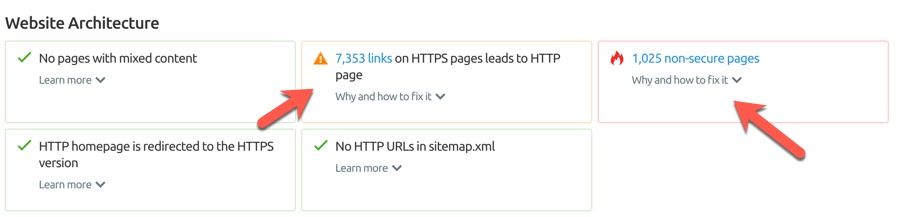
Discovering non-secure pages:

This issue is triggered if the SEMrush Bot detects an HTTP page with a <input type=”password”> field. Using a <input type=”password”> field on your HTTP page is harmful to user security, as there is a high risk that user login credentials can be stolen. To protect users’ sensitive information from being compromised, Google Chrome will start informing users about the dangers of submitting their passwords on HTTP pages by labeling such pages as “non-secure” starting January 2017. This could have a negative impact on your bounce rate, as users will most likely feel uncomfortable and leave your page as quickly as possible.

If you have effectively implemented an SSL certificate & are serving all of your pages properly, this result should show zero non-secure pages.
However, in my case, I have 2 sub-domains which I have yet to move to HTTPS.

Site Audit
Depending upon the complexity of your or your client’s website architecture, this tool can help you discover severe SEO issues which are not easy to discover manually.
Most of you who have used my earlier guides on HTTP to HTTPS migration will either have no issues or very minor ones.
If you need those tutorials, they’re here:


However, it would be very unwise for anyone to be over confident & not use another tool to ensure the HTTP to HTTPS migration is problem-free.

Since SEMrush offers a 14-day free trial, it’s a good starting point for anyone to test out their HTTPS implementation.
  • Check your site’s HTTPS implementation issues
Go ahead & do a complete SEO audit using the above tutorial.
Let us know what kind of HTTPS implementation issues you have found using this tool. Also, if you are stuck somewhere while fixing the issue, let me know in the comments section below and I will help you along.
Know someone who is waiting to migrate from HTTP to HTTPS? Share this guide with them to help them avoid any SEO blunders!

Changing Domain Names? Learn How To Tell Google About Site Address Change

Changing Domain Names? Learn How To Tell Google About Site Address Change
Change domain name without losing search traffic 


Do you know you can change your domain name without losing search traffic?
Yes, it’s possible.


But once you have changed your web address, you need to do some post-site address change things to ensure you don’t lose organic traffic.
If you don’t tell Google about this change of address, you might be putting your site’s organic ranking into danger.

Let me help you with fixing this potentially big error.
(In the below example, I have placed a URL change request using the Google Search Console. The process is the same for anyone needing to change their domain.)
Let me first give you a background of why I had to change the URL of one of my popular niche blogs.
If you are a regular reader of ShoutMeLoud, you might be aware of our niche WordPress blog. The name used to be WPFreesetup & lately, I realized the name of the blog could be better.
When I started WPFreesetup back in 201o, my goal was different & a lot has changed in the past 6 years.

This is when I decided to change the name from WPfreesetup to WPsutra.
“Sutra” is a Sanskrit word that means a set of texts on grammar or Hindu law or philosophy. (If you want to learn more about Sutras, you can learn here at the WikiPedia page.)
Now, changing an existing website URL is no joke.

It takes a lot of precision to ensure you don’t lose search traffic and a lot needs to be done to move everything (other web properties) from the old domain to the new domain.
Thanks to Kinsta hosting customer support, changing my domain name took only 5 minutes.
When you change URLs, one thing you need to take care of is 301 redirection. Every page from “Domain A” should now point to “Domain B”.
For example:
DomaninA.com/123.html should 301 redirect to DomainB.com/123.html
You can verify the same using an online redirect checker.  Here is one such redirect checker.
Here’s my redirect status:
Check 301 redirect status
I hope this clears up the basics. Now it’s time to look at the steps that you need to follow for placing a site address change request.

How to successfully place a site address change using the Google Search Console

  • Login to your Google Webmaster Tool account.
  • Open the website which you want to move.
  • Click on the “Gear” icon & select “Change of Address”.
Change of address
  • On the next page, pick your new site from the list.
  • Confirm that the 301-redirects work properly (see above).
  • Check that verification methods are still present.
Google Change of address tool
Once you have confirmed everything, click on “Submit”.
You will see this message:
  • “Submitted – Your request for a site move has succeeded. If you believe this is an error, you can withdraw the request.”
Site address change requested successful

What happens after putting in a request for a site address change?

This request allows Google to index your new URL at the new address while minimizing impact to your current ranking in Google Search results.
Additionally, all Google Search results for your site will now be redirected to the new domain automatically for 180 days. You must still update any resources on your site such as tags or headers that refer to the old domain.

Doing this will ensure that traffic fluctuation due to this URL change will not be high.
I hope this guide helps you to change your site address without losing search engine traffic.
In an upcoming guide, I will be sharing other important things to do after changing your domain name.

If you know any blogger friends who are about to change his/her domain address, do let him/her know about this guide. It may help them (& they may buy you a coffee someday).

Best 6 Awesome Tools to Find Long-Tail Keywords In Any Niche

Best 6 Awesome Tools to Find Long-Tail Keywords In Any Niche

I have written a lot about keyword research and its benefits. One of the major mistakes I have seen many people make is that they will target direct keywords instead of long-tail keywords (LTK) .
If you are not familiar with long-tail keywords, here is a quick example of the difference between short-tail and long-tail:


  • Long-tail Keywords (Ex. of short tail keyword) – Monthly searches 50
  • Long tail Keywords vs. short tail Keywords (Ex. of LTK) – Monthly searches 12
  • long tail keywords conversion rate (Ex of LTK) – Monthly searches 13
You may notice that the last two keywords have fewer searches, but the competition for these two keywords is far less than it is for the short-tail keyword. Also, long-tail keywords drive more targeted traffic than short-tail keywords do, so your conversion (sales, email sign-ups) improves a lot. If you want to learn more about this subject, check out How long tail keywords could equal massive success.
In this post I am sharing some of the best tools for finding long-tail keywords in any niche. Note that some of them are free, and a few of them are paid. I will explain the features of each, and you can choose any one that suits your needs.

Best Online tools to find Long-Tail Keywords:

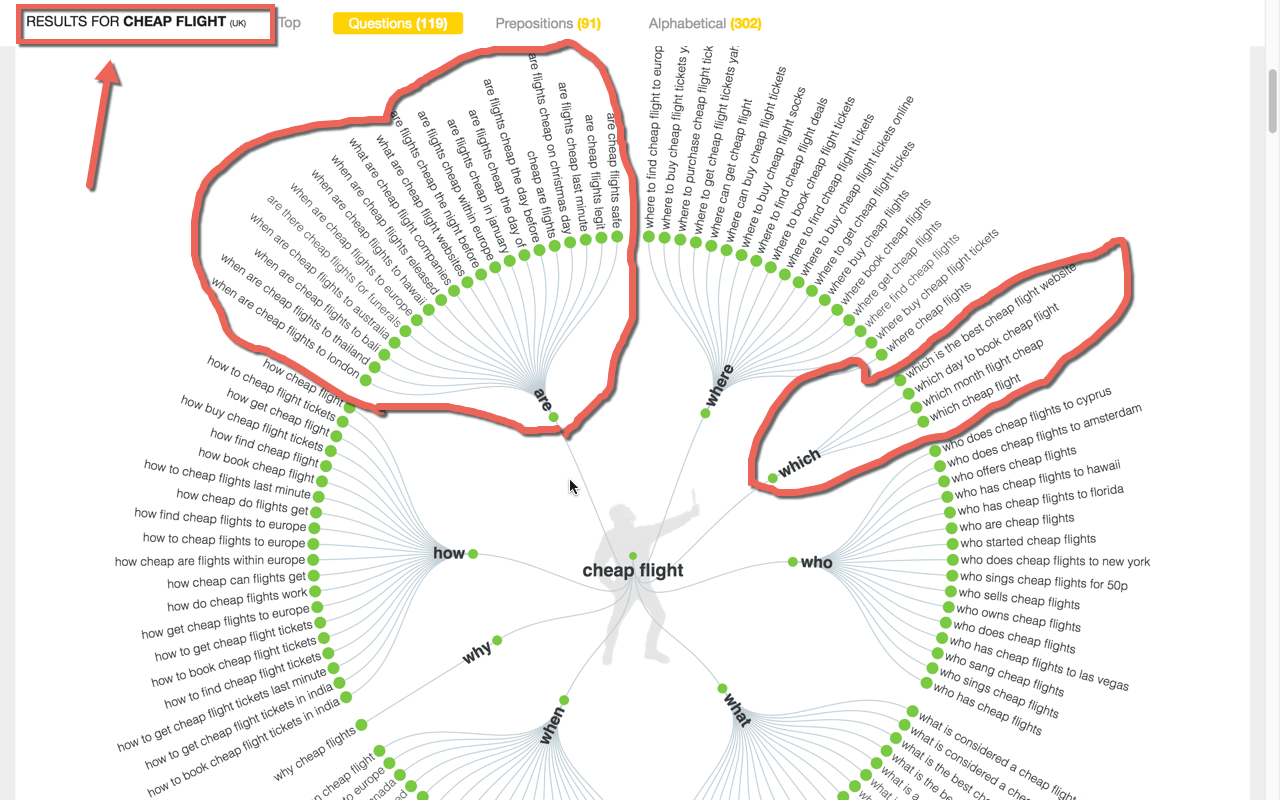
Answer the Public:
Find Long Tail Keyword question based

This one is one of my favorite free long tail Keyword research tool. This one is in the line of Ubersuggest  but offers one unique proposition. Using this tool, you can search for any Keyword & it would show you common questions asked around that “Keyword” “Topic” in search engine.
Check out Answer ThePublic
SEMRUSH:
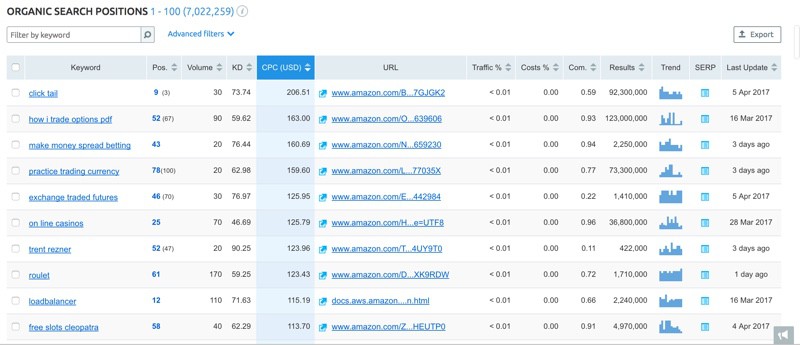
This is the tool that all the SEO guys use as a complete SEO suite. SEMRUSH is the first finest SEO tool that was ever built to find keywords that your competitors are ranking for.


Unlike traditional keyword research, SEMRUSH takes away the guess work & help you quickly find long tail keyword from any website.  If you are looking for one perfect tool for long tail Keyword research, look no further than SEMRUSH.
You don’t have to believe me rather for next 14 days use SEMRUSH for free. 2 weeks are enough to help you decide if SEMRUSH is for you or not.
Try SEMRUSH for 14 days
KWFinder::
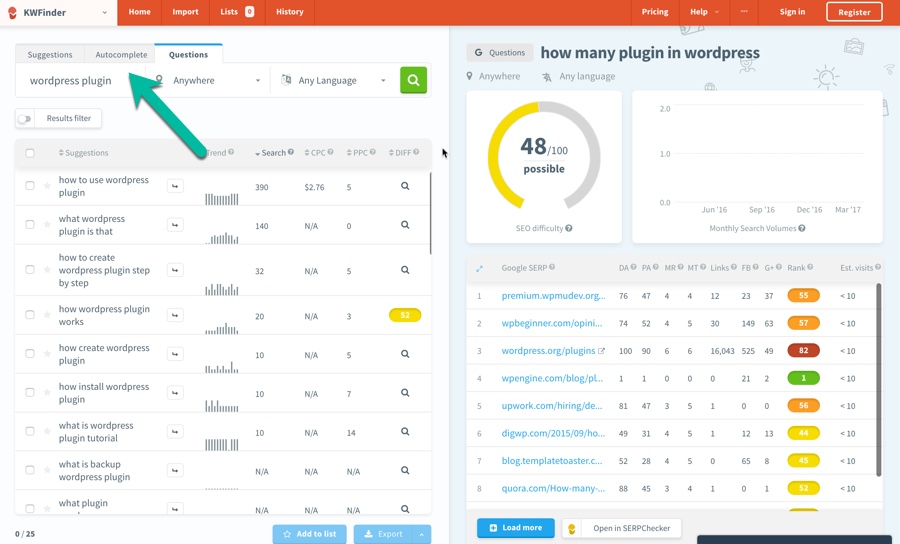
This is one of the newest entrant in the Keyword research tools market. However, the kind of features & functionalities KWfinder offers, it’s certainly one of the best tool out there.


KWfinder provide all important data about the keywords including difficulty level to help you find the easy to rank long tail Keywords. Persoanlly, after SEMRUSH is this is the second tool I use & recommend.
Check out KWfinder

Google Auto Complete tool:
Long tail keywords suggestion
The auto-suggestion feature of Google search is your first free tool. This is a handy feature from Google, which will allow you to easily find long-tail keywords in any niche. Google auto-populates keywords (search terms) based on popularity. All you need to do is start typing your first keyword, and select the options from the auto-suggestion.
You will need to use another keyword tool to see additional details such as the number of searches, CPC, competition and other important information.  (On my micro-niche site, I usually skip the competition check because it is easier to get a higher ranking with a niche site.)
Google Auto-suggest:

Google Auto suggestion long tail Keywords
This is a tool by Keyword Tool Dominator which actually takes the default feature of Google’s auto-suggestion to the next level.
With this free tool you can easily find all auto-suggested keywords, and it will allow you

to download keywords in .csv format.
You can then use any of your favorite keyword research tools to check other important details about the keyword.
If you are using Google search to find new long-tail keywords, I highly recommend that you make a shift to this one.

WordTracker Keyword Tool:
WordTracker is a popular SEO keyword tool. Using WordTracker Keyword Tool you can easily find profitable long-tail keywords along with important details like searches, competition, IAAT (keyword in anchor and text) and KEI (keyword effectiveness index).
With a free confirmed account you will be able to get 100 keyword results. I actually find this tool to be very effective, as you can easily find long-tail topic ideas. Here is a screenshot of this tool in use, to give you a better idea:

Wordtracker Keyword tool
You can also consider taking their 7-day free trial to get advanced features like:
  • The ability to see 2000 search results
  • The option to use the related search tools (this is very handy)
  • Access to search engine data using SEMRUSH
  • The option to save your lists
  • The option to get other details like competition details and KEI
You can create a free account for WordTracker and start using this tool right away, or grab a 7-day free trial of their advanced version as suggested above. Here is the link to sign-up for a free account.
UberSuggest:

Ubersuggest Long Tail Keyword
UberSuggest is a fantastic free long-tail keyword research tool.


I have written about UberSuggest before, and Steven has previously explained how he is using this free keyword tool for finding post ideas.
With UberSuggest you will not get important keyword details like keyword competition and search volume.  This tool is best for generating ideas for your long-tail keyword articles.
You can try Ubersuggest here, and read a complete review here.

Long Tail Pro:
LongTail pro is another paid tool, and it offers many features in addition to finding profitable long-tail keywords. They used to be desktop based solution & now everything is on cloud. They are popular among niche marketer & a good tool if you are looking for paid options.
You can grab a complete 10-day free trial from here
.


These are some of the best paid and free long-tail keyword tools and software I have tried and can recommend freely.
Once you have compiled a list of keywords, your goal should be to write down high-quality content, targeting those keywords.
Other long tail keyword research tools:

You can check out this guide to understand what you should focus on in order to create high-quality articles.
And here is a guide to making your article’s keywords targeted.
The key is to write content targeting your users, and then work on optimizing things like heading tags, meta title and description, readability, LSI and keyword density, to make your article search-engine-friendly.
Here are a few more free SEO tools that you should not miss:


If you know of other free tools or software for finding profitable long-tail keywords, do let me know via the comments section below.

Do share this collection with other blogger friends on Facebook and Google Plus!

How To Show Different Post Titles To Readers And Search Engines

How To Show Different Post Titles To Readers And Search Engines
As bloggers, when we write a blog post, we tend to write a catchy title so that it will increase the CTR (because readers love to click on things with catchy titles).
But one problem with this approach is that if you optimize your post title for readers, you miss out on one of the most important aspects of post titles: Search engine optimization (aka SEO).


I have talked a lot about the importance of keyword research, and how to perform keyword research, and tools you can use for keyword research. Once we have our target keyword(s) in hand, it’s time to write some high-quality content that keeps both readers and search engines in mind.
Our target is to write content which is reader-oriented, but also search engine friendly. We should apply basic on-page optimization techniques, and use plugins like SEOpressor.

One Title For Readers, One Title For Search Engines
Suppose you write this post title:
“Make Money Online with Infolinks”
Competition in search engines is very high for this title because it contains the words, “make money online”.
But you can optimize this title to make it rank higher on search engines by keeping it about Infolinks (our main keyword).
So now we have two titles:
  • User-friendly post title: Make Money Online with Infolinks
  • Search engine friendly SEO title: Infolinks: In-text Advertisement Program (Review)
And how do we create these two titles?

Optimizing Post Title for Both SEO and Readers in WordPress:

Most of the WordPress SEO plugins like SEO by Yoast, Platinum SEO, All In One SEO, the inbuilt SEO features of Thesis (…and many others) offer you the option to write a different title for search engines (technically called a “meta title”).
Here’s the difference between a meta title and a post title:
If you are using WordPress as your blogging platform, head over to this post:


Now whenever you write an article, after writing the user-friendly title, go down to the end of the page to the SEO section.
Add in your “SEO title”, which is what will be displayed in search engines. Also, don’t forget to add a unique meta description in 158 characters to make your post even more search engine friendly.
I recommend you read this post which talks about how to make your blog post targeted for certain keywords.
Make it a habit to optimize your blog post for both readers and search engines. This will help you rank better and increase your readership.
When you write a meta title for search engines, always keep CTR in mind. A catchy post title will help you get a better CTR, and search engines follow click patterns to judge the quality of a page. This will ultimately help you rank higher.
For more SEO tips, refer to the following articles:

If you have any other questions related to creating meta titles, let me know in the comments and I’ll be happy to answer your query.
Like this post? Don’t forget to share it!

Best 3 Easy Tweaks to Get More Clicks from Google Search

Best 3 Easy Tweaks to Get More Clicks from Google Search
Ranking #1 in a Google search is the best thing that can happen to your blog, and while it’s not impossible, it is certainly not easy.
When you are ranking among the sites on the first page of a Google search, but your site is not in the top three search engine positions, how can you use that rank to improve your position? This is an important question and one which requires a review of a few different techniques you can implement to get higher CTR from a Google search. I have tried and tested these factors and they have worked for me, so they should work for you too.

 et’s have a look!

Tips to increase your click-through-rate from Google’s search engine:

Star rating in Google search:
Showing star ratings in a Google search is a powerful way to get more CTR. Not only does it make your results stand out within the search engine results, it also helps in getting clicks. It offers more information in the search engine and thus helps to drive more traffic to a webpage.
If you write review articles, such as web hosting or web apps reviews, for example, you can use the Google Rich Snippet star rating to make your reviews stand out. These star ratings work to rank the product you are reviewing, and they clearly stand out. With a star rating, you can easily make your review article stand out even in competitive keyword results. WP Review Pro is the best plugin for showing star ratings in searches, while also allowing you to add a review box in your blog post.
Google Search star rating
Along with star ratings, you can also add a nice call-to-action button at the top or at the end of an article that will help you to get more CTR to the product you are endorsing. If you are a blogger in any niche and you review services, products, apps, mobile phones, etc., use this plugin and you will notice a great improvement in the Google search CTR to your blog.
Get WP review Pro Plugin

Remove dates from Google SERP’s:
Dates are very useful for letting readers know when a blog post was written, thus allowing them to understand how recent the information they’re reading is. When you have an older blog, despite having written and published evergreen content on that blog you may notice poor CTR from Google searches due to dates in Google SERP’s. I mention this in greater detail in my Google Panda recovery guide.
There are ways to tweak dates so that they show up in your blog posts but are hidden from Google searches.  For instance, on my blog I have a habit of constantly updating my old posts to keep the content/information up-to-date, and this works very well.
If you have been noticing poor CTR for your older blog posts, my recommendation would be to remove the dates from Google SERP’s for your blog posts, keep your content up-to-date, and you will notice a significant improvement in CTR.

Meta description and meta title:
This should probably be first tip I offered in this post, but because it is among the oldest techniques, I am offering it last. Google and most other search engines use your meta title and meta description to show information in Google searches. Writing call-to-action meta titles will help you to get better CTR, and writing detailed meta descriptions using keywords will help you to get better rankings.

Meta title and description
You can use plugins like WordPress SEO by Yoast, or if your theme offers post SEO options, you can use it to write meta-post titles and descriptions that will help you to increase your Google search CTR.

There are other factors such as Google Plus “likes”, or using video thumbnails and instant previews that are also helpful in maximizing CTR from Google searches. But for now, if you implement the latest SEO techniques on your blog as noted above, you will be improving the way your blog post’s listings stand out in Google searches.


Use the comments section below to let me know if you use any other technique that helps you to get better CTR from organic searches.

If you find this article useful, don’t forget to share with your friends and colleagues on Facebook, Twitter and Google Plus.

Best way To Get Organic Traffic From Search Engine To Your Blog

Best way To Get Organic Traffic From Search Engine To Your Blog
I think you’ll agree with what I’m going to say:
Getting traffic from search engine is hard..buying traffic is easy.


But do you know
Organic traffic (Search traffic) is the best traffic for your blog or business.. as it sends you most targeted traffic.
Well, there are ways by which you can start getting traffic from search engines naturally. You will learn it right now, here.
There are unlimited ways by which you can drive traffic to your site. We have already discussed some of the working and actionable methods like using Blog commenting, Guest posting campaign, using Flickr, buying paid traffic and today we will see how we can increase and get organic traffic to our blog and Websites.


Get Organic Traffic


The best of profitable visitors which you can get to your site is from Organic search results. This means, when people search for something and land on your website because these are the people who are most likely to convert into customers or clients. In blogging, it’s also most profitable as users will be seeing more high CPC Adsense ads, as they will see ads based on their search term.
Even direct advertisers look for the blog, which gets natural traffic from search engines. Now, there are many search engines like Google, Bing but we mostly target Google as it’s one of the most used and popular search engines. For Bing, you can refer to our earlier guide on Getting Started with Bing Webmaster tools.

If you have noticed ShoutMeLoud monthly traffic reports, then you might have checked that ShoutMeLoud gets its maximum traffic from Organic search results. Getting traffic from Organic search is always beneficial when it come to generate income from advertisements and affiliate programs.
Another good reason to get organic traffic is that we get targeted visitors thus it increases the chances to lower down bounce rate and revisiting of readers.
Apart from organic traffic there are other ways to drive huge traffic from social networking websites like Twitter or sometimes images might also help you to get targeted traffic.
Here are few articles which might help you to get good traffic apart from search engine traffic:

How to increase organic search traffic

There are various things which you can do to get organic traffic and most important is SEO and we will start with the same.

SEO – Make Search engine easily access your blog
SEO is all about search engine optimization. Making your site more search engine friendly and giving them what people are looking for. There are various aspect of SEO and it starts from On-page SEO, off page SEO, and on Site SEO.

The best place to start is with On-site SEO. Make sure your site is not only indexable but also all important part is crawlable by Google bots. We always prefer to give you tips on SEO and quality articles, both the things go hand in hand when you want to generate traffic from search engine.
It is important that you must take good care of Titles, Tags, URL, Descriptions, broken links etc. There are many things which must be taken care about when it comes to SEO. You can refer a checklist of SEO, which will help you with good organic traffic.

SEO optimized content: Write content that search engine understand
Content marketing is the best way to attract organic traffic. The key is to write content based on something what people are seeking for. For example, this piece of content is written to make people understand how ogranic traffic will help and how you can increase it.
Similarly, a Website selling fashion cloths can write about content based on what kind of fashion trend is going on and channelize it to drive traffic to their product page.

Though, writing SEO optimized content is not easy as it consist of many steps, which starts from doing Keyword research, writing content based on our Target Keywords and then promoting the content to increase it’s search engine friendly.

We have already covered everything you need to write content which drives organic traffic, and below are few articles which you should check out right now, which will help you to make most out of content marketing to get organic traffic.


Link Building – It works as a trust vote

Link building is a part of SEO strategies. Search engines loves quality links and hate irrelevant links. Thus it is important to have relevant and quality links to your blog.
Links can be backlinks, outbound links, reciprocal links, connect to other blogs directly or indirectly but the only thing to remember is to get links from good PR and same niche blog.
Specially avoid falling into the trap of buying backlinks for sake of improving your search engine ranking as Google have rolled out an algo update called penguin update, which will flag all such sites who are using spam ways to get links to the site.

The best and easy ways to get link to your site is by Guest posting and blog commenting. Write content which are not only unique but also attract organic backlinks, which will help the most.
Maintain blog frequency – Regular content keeps reader happy
Many bloggers don’t get time to maintain their blog frequency thus search engine bots also don’t like such blogs much. It is not that tough to maintain blog frequency, just need to be bit organized. But writing post frequently doesn’t mean that you write articles not related to your niche. Always write article related to your niche and take care about keywords.

Make traffic revisit
So you succeeded in getting traffic from your search. But what next?
Many bloggers miss out on taking this to the next level, and later on regret.
Don’t you want that visitors should stay on your blog regularly? If you haven’t thought about it, you should. As returning visitors are audience, brand advocate.
These people are the one who will share your post on social-media, will tell people about your blog.
How can you do that?..
.. The process is simple as you need to play one secret trick. You need to give them option to subscribe.
I’m sure you have your Facebook page, Twitter page all setup..but are you giving them option to subscribe via email?
Understand one simple yet powerful thing,
You might not check your Facebook, twitter always, but you will always check your emails. If my email hits your inbox, you will either open it or delete it.
Point is, you will see it & take an action. Since ShoutMeLoud sends high quality posts to email subscriber, our open rate is about 16.3%, which is  a good number.

email open rate
Do a simple math:
Email was sent out to approx. 6000 subscribers
16.3% opened the email : == That is 978 readers
6.2% clicked == that is 372 returning visitors…
.. These are the people who will be sharing or commenting & increasing the social value of the post.

Want to do the same for your blog?
Offer email-subscription on your blog. Good placement is after blog post & the sidebar…
.. This is what we use at ShoutMeLoud
Harsh has put a brilliant & easy to follow guide here to getting started with it.
You can read his guide over here & create email subscription box for your blog. If you looking for the best plugin to add the box on your blog, use this easy to use WordPress plugin call OptinMonster.
This is by prominent WordPress developer, and trusted by thousands of bloggers around the globe.

Social media promotion:
Social recommendation is the best way to promote a product and people are more likely to trust something when their friends or family recommend something to them. Google understand it and they are taking social media as a great signal to rank a content…
..You need to make sure your content are sharable..
and you should add social bookmarking buttons on your blog so that people can easily share your content on their favorite social bookmarking sites.

Avoid unethical ways
Many bloggers use unethical ways like link farms to get good search engine ranks and drive traffic but it can result in your getting your blog blacklisted. Getting good ranks in search engine through ethical way might take time but it gives good results in long term to increase organic traffic.
There is no rocket science or secrets to get good amount of organic traffic for your blog. You just need proper strategy for same. If you know any useful strategy to increase organic traffic then do share with us.

How To Change Post URL of Already Published Post Without Losing Traffic

How To Change Post URL of Already Published Post Without Losing Traffic
What you are going to learn today will help you throughout your online career. This tutorial is useful for any blogger, writer & SEO professionals.  In this guide you will learn about:
  • What is the slug in SEO
  • What are stop words
  • What is 301 permanent redirect
  • How to edit post slug of a new post in WordPress (BlogSpot users can follow this guide)
  • How to change the Post URL of already published post
  • How to set up redirection in WordPress
Most of us learn about on page SEO at the later stage of our online career. Chances are, you might have already published a good number of blog post before you learned about the keyword optimization.


If this sounds like your story?
Well, I’m sure the next thing that made you stuck in your progress is: How do I take care of already published posts?
If you had tried editing the post slug of your old posts, you might have encountered 404 error & various other issues. This guide is the answer to all your questions & issues that you may or might encounter while changing already published blog post link.
Before you look into the solutions, first you need to understand some basic yet most important SEO terms. This term applies to any kind of Website or blog that you are running. Knowing this will also help you to analyze SEO techniques of other blogs & make your blog structure more search engine friendly.

What is post slug in SEO?

To understand post slug you need to first understand permalink. Read this guide that explains what permalink is & best permalink structure for SEO.
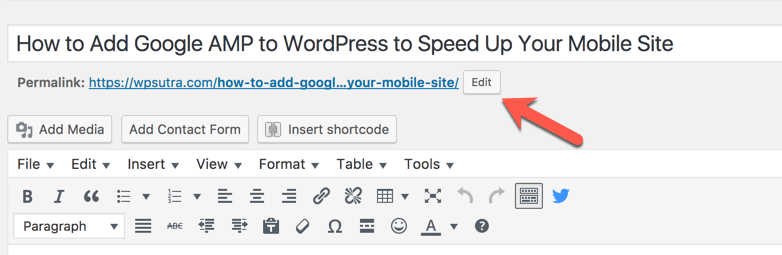
Post slug is the words that come in a blog post link after your domain name. For example,

Google-amp-WordPress is the post slug in the above screenshot.
In WordPress, post slug is automatically created from the post title. In the above screenshot, I have edited the post slug to make it search engine friendly.
Let’s take a step back & let me show you what is the default slug created by WordPress when you write a blog post.


As you can see the default slug created by WordPress is:
how-to-add-google-amp-to-wordpress-to-speed-up-your-mobile-site
The problem with default slug (Above example) are a lot of stop words which are useless & not recommended when you are optimizing your post for specific keywords.
This is a good time to learn about stop words.

What are stop words in SEO?

The most common words which are filtered by the search engine in a query are called stop words. An example of such words are: a, an, the, are, by, both
There are many stop words that shouldn’t be part of your post slug. Here is the mega list of stop words.  Stop words are not used or weighted heavily to determine relevancy in search algorithms.
  1. Post slug with stop words: how-to-add-google-amp-to-wordpress-to-speed-up-your-mobile-site
  2. Post slug without stop words: Google-amp-WordPress
In the first one, you can see you have 13 words in your post slug. In the 2nd one, we have only three words in post slug. This means that the important keywords in the first option (Google-AMP-WordPress) are given only half the weight they would have if there were no SEO Stop words. The second one (Post slug without keywords) contains more keyword juice than the first one.
Bonus tip: You should avoid using too many stop words in your post title, description (Without affecting readability), image alt text.
I don’t recommend you to go back & edit all blog posts & change the slug to remove the stop words. However, you can do that for important published posts which are not performing at all. Moreover, using this you know how to take care of future blog posts.

What are 301 permanent redirects:

When you are changing the post URL or permalink structure, we use 301 redirects. This is the best way to ensure that users and search engines are directed to the correct page. The 301 status code means that a page has permanently moved to a new location. You can set 301 redirects using .htaccess at the server level or if using WordPress there are plugins to help you such redirection.
This is the best way to move your WordPress.com blog to self-hosted WordPress & migrate BlogSpot blog to WordPress.

We will be using 301 redirects to notify search engine when we change post slug. I have explained this in details in the upcoming section of this guide. For now, it’s a good time to watch this video to learn more about 301 redirection:


How to change the Post URL of the new blog post:

When you are writing a new blog post in WordPress, click on edit below post title to change the post slug.


Clicking on edit will bring a screen like this where you can remove the stop words.

Make sure there is – (dash) between every word. Here is the final result:

This is one practice you should follow for all your future posts. Now, if you are wondering how to do it for already published posts, follow the steps.

How to change the Post URL of already published post

Like above, we do the same step for the already published post. When we edit existing slug, it would result in broken post. That means, if the search engine has already indexed your old slug or you have shared the post on social media, clicking on those links will result in 404 broken page. To avoid this, what we do is take help of 301 redirect feature.
Note: BlogSpot users can follow this guide to learn about custom permalink

How to set up redirection in WordPress

One of the reasons I love WordPress is for its simplicity to get tedious tasks done with the help of plugins. There are many WordPress plugins that will help you to set redirection. The one that I use is free redirection plugin. If you are using Yoast SEO premium, redirection feature is available for you already. You can also use any other plugin if you like. The only thing you need to ensure is, it should be a 301 redirection.
For this example, I’m using Redirection plugin.
Here is the scenario:
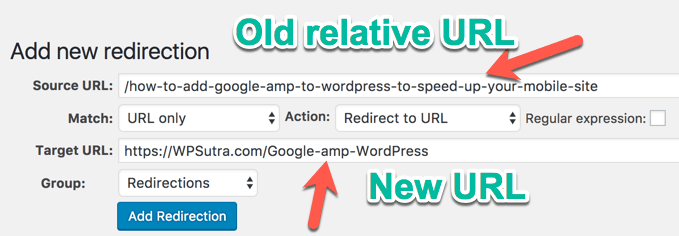
  • Already published post with URL: https://WPSutra.com/how-to-add-google-amp-to-wordpress-to-speed-up-your-mobile-site
  • New URL After editing the post slug: https://WPSutra.com/Google-amp-WordPress
Go to Tools > Redirection (or redirection tab of any other plugin that you are using). You can also set redirection using the .htaccess method.
Here you can set the 301 redirect from old post to the new one as shown in below screenshot:

What this would do is, when someone will click on your old URL, they will be automatically redirected to new URL. This would ensure you wouldn’t lose any traffic after changing post slug of the already published post.
Do note that you would lose your social media shares number & that is a very little trade-off you need to make when dealing with editing old post URL. I usually do this for editing my old blog posts or dealing with non-performing blog posts.

Fine points when dealing with editing already published posts:

  • It’s completely fine to edit old post slug as long as you are setting up 301 redirect.
  • You would not lose any search engine traffic when editing post slug & setting up 301 redirect.
  • You would lose social media share as the post link changes.
  • It’s not recommended to change the slug of a high ranking blog post.
  • This is part of On page SEO.
From now on you should definitely practice this for all your new blog posts. At the same time, you can start editing post slug for the non-performing posts. Make sure you also follow steps listed here to make your post keyword optimized.
If you have questions regarding Stop words, 301 Perma redirect or changing post URL after publishing, feel free to ask in the comment section below. If you enjoyed this guide, do share it with your friends on Facebook & Google plus.

Ten Basic SEO Tips for Any New Website

Ten Basic SEO Tips for Any New Website
Once I’ve created and launched a new website I look to promote it online using various SEO techniques. These techniques generally stay the same no matter what type of website I launch – be it a blog, business site or brochure site. Today I’d like to share with you my top ten tips to follow after launching a new site; hopefully these will help new developers and act as a nice reminder for those more experienced.


Basic Seo Tips

 Backlinks are an essential building block to help your site and some of the methods below will help you gain those valuable backlinks, other methods will help spread the word about your site, help you inform search engines your site exists and help you track backlinks, errors and search queries.


Basic SEO for a New Website:

Be it BlogSpot, WordPress, Static Website or any other platform, when you are launching a new Website, there are few basic SEO techniques, which goes for every type. These SEO tips, should be followed by everyone, and if you have question regarding any of these tips, feel free to ask me via comments.
Before, we move ahead here are few articles worth reading:


Create and submit sitemap

Sitemaps help search engines discover all the content on your site, essential for new and old websites alike. You should ensure your sitemap conforms to the sitemap protocol and there are many free and paid for website and software companies that can automatically create a Sitemap for you. If you are using WordPress, you can use Google XML sitemap plugin to create sitemap for you new WordPress site.


Webmaster’s tools

Google, Bing and Yahoo all have webmaster sections for you to log in and tell them about your site. Once you have confirmed you’re the site owner you can submit your sitemap you made above, view details of sites linking in to you, top keywords and any errors they find when crawling your site.


Blog Commenting

Make your comments useful, not spammy as this will only waste your time when the editor deletes it. Comment on blogs relevant to your website and hopefully they’ll allow you a backlink. If not at least you are spreading word about your site to the relevant readers and you never know, they might have websites and add a link to you.


Social Bookmarking

Another useful way to spread word about your site and hopefully gain valuable links back is to take advantage of social bookmarking. Add pages (not just your homepage) from your site to some of the top bookmarking sites such as; Delicious, Digg and StumbleUpon. It also useful if each page or blog post from your site offers readers the chance to share your site to their bookmarking account. Consider adding share buttons or a toolbar such as those offered by addthis.com to your pages.

Twitter
Build up a good following of relevant businesses, clients and those in related industries and the benefits can be huge. Post useful tweets and occasionally throw in articles, news, or blog posts from your site with a link back to them. Don’t just jump right in for sell, sell, sell or you’re liable to put off followers. Add a tweetmeme.com button or similar to your pages too.


Facebook

This site has over 500 million members so adding a page on here is a must. Add Facebook like buttons to your website too so that visitors can share your pages with their friends. We have a good number of articles, related to Facebook marketing for a new website. Here are few links, which will help you to get started:

Exchange links
Most webmasters are happy to link to good quality, relevant websites so try contacting a few direct. When gaining links always link to sub-pages or folders, don’t just concentrate on your homepage. Looking for a good tip at finding sites that will link to you? Google “Add Link” followed by your website niche for a list of relevant sites that you can submit links to. Though 2 way link-exchange is a big no. Also after Penguin update, I highly recommend you to get backlinks from relevant niche. Here are few more resources, to help you build links for your new Website:

Submit a press release
Announce to the world you’ve launched, what you offer and why you do it best. Ensure it’s a good, well written press release and if necessary hire someone to write it for you. Then you need to get your release out there. The web has some good auto-submit press release sites that can often gain you links back but also consider local press, trade magazines or any publications concentrating on your niche. Do remember, Matt Cutts (Google Sposkesperson), recently added that Press release doesn’t give SEO advantage, but reports from SEO world shows that Press release still helps in search engine ranking.

Internet Directories
Submit your site to good quality internet directories such as DMOZ, Yahoo Directory, Business.com, Yellow Pages and Best of the Web. Some of these are paid and none offer guaranteed inclusion so ensure you meet all terms and conditions before submitting your site. Some directories are deemed to offer good quality backlinks so it could be well worth the initial investment.

Don’t stop your SEO Effort!
This one’s simple, don’t steam ahead, and do all this in one weekend and then forget about it! You need to constantly work hard, publish fresh new content, talk to your twitter followers, post updates to Facebook, build a good reputation on forums and blogs, get to know press contacts and keep them up-to-date with how you’re doing and eventually the web will build trust in your site.

Do remember, SEO is an ongoing effort, and you should keep monitoring your site for progress. You can try tools like SEOMOZ, which will crawl your new Website like a search engine bot, and will give you recommendation to improve your site. So there you have it, the top ten basic SEO things I do to launch a site. I hope some of you found this useful, feel free to share what you do too!